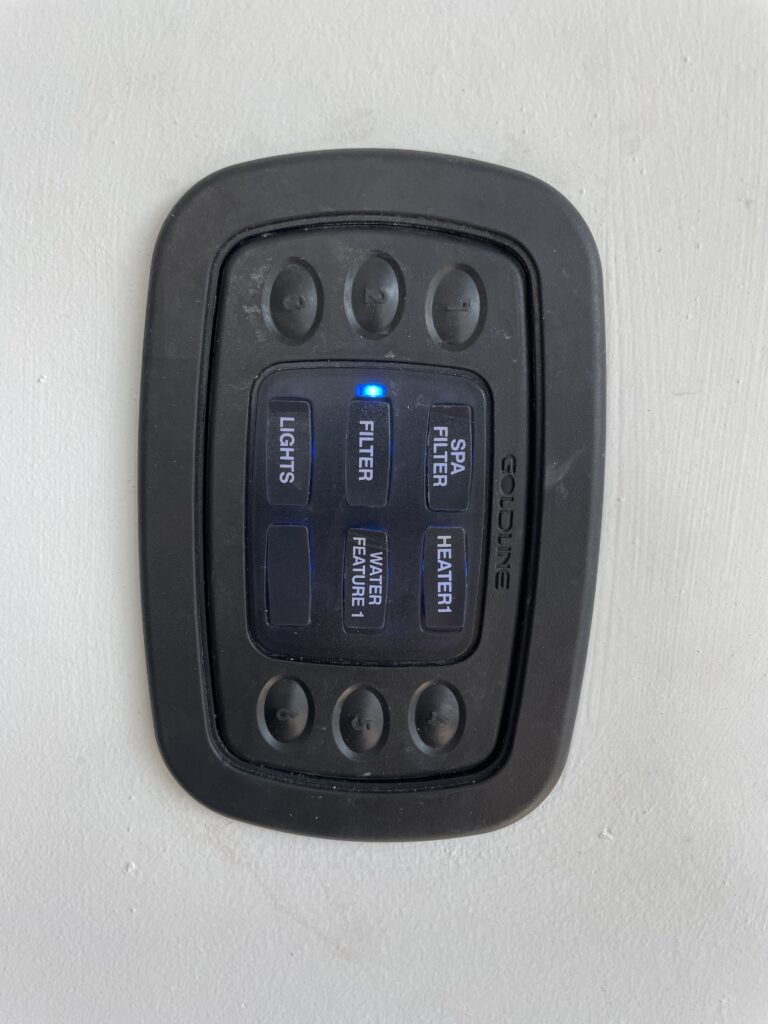
Controlling the settings for the pool may all be done from the remote on the wall next to the back door. The remote has 5 buttons to control the spa pool. When you press the button a light will turn on next to the label for the button. On the image on the left – all the lights are turned on.
Each button functions as follows:
LIGHTS – Turns on lights, turn on and off to change light colors; Lights are not working correctly
FILTER – Turns on pool pump, filter pump and 3 pool fountains
SPA FILTER – Turns on spa/hot tub pump
HEATER1 – Turns on pool heater. If the SPA FILTER button (light) is on then the pool will heat hotter as the heater will function as a spa/hot tub. If the SPA FILTER button/light is not on then the pool will keep warm but not as hot as a hot tub. The heater will automatically turn off after 4 hours.
WATER FEATURE 1 – Turns on the pool jets – like a hot tub
Note: the pool is on a timer and the FILTER will automatically turn on during the day to filter and clean the pool.
If you just want to keep the pool warm then turn FILTER and HEATER1 on.
If you want to use the pool like a hot tub then turn FILTER, SPAFILTER and HEATER1 on.
Please turn off HEATER1 when you are finished using the spa pool.
Also, do not attempt to change settings at the pool equipment on the side of the house